

Case Study: End-to-End Analytics Telegram → Bitrix24 for KuriloCar
KuriloCar specializes in sourcing and delivering cars from Korea. One of their key acquisition channels is Telegram: traffic flows into a channel, then into a bot, where managers communicate with clients via Bitrix24 and close deals.
The task they came to us with: understand which traffic source actually drives sales. The main challenge — the customer journey spans multiple platforms, and the sale happens in the bot, far from the original entry point.
Step 1. Tagging Traffic in the Channel
First, the channel and bot were connected to Graspil, and all incoming traffic was tagged with UTM parameters.
Two tools were used:
- Telegram invite links — for internal Telegram traffic
- tlin.cc links — links provided by Graspil: when a user follows such a link, UTM parameters are automatically carried into Telegram and attached to the user. Used for external traffic: https://tlin.cc/kuriloexport
Now for each UTM parameter it’s clear how many people joined the channel and how many left.
Step 2. Tagging Bot Links
Every link to the bot — including links from specific posts — was also tagged. For example, a link from a specific post looks like this:
https://t.me/kurilocar_bot?start=m-06_d-11_post-3
Using the start parameter, Graspil knows exactly which post the user came from. This made it possible to see which publications perform better and what content drives bot launches.
End-to-End Analytics Starts Here
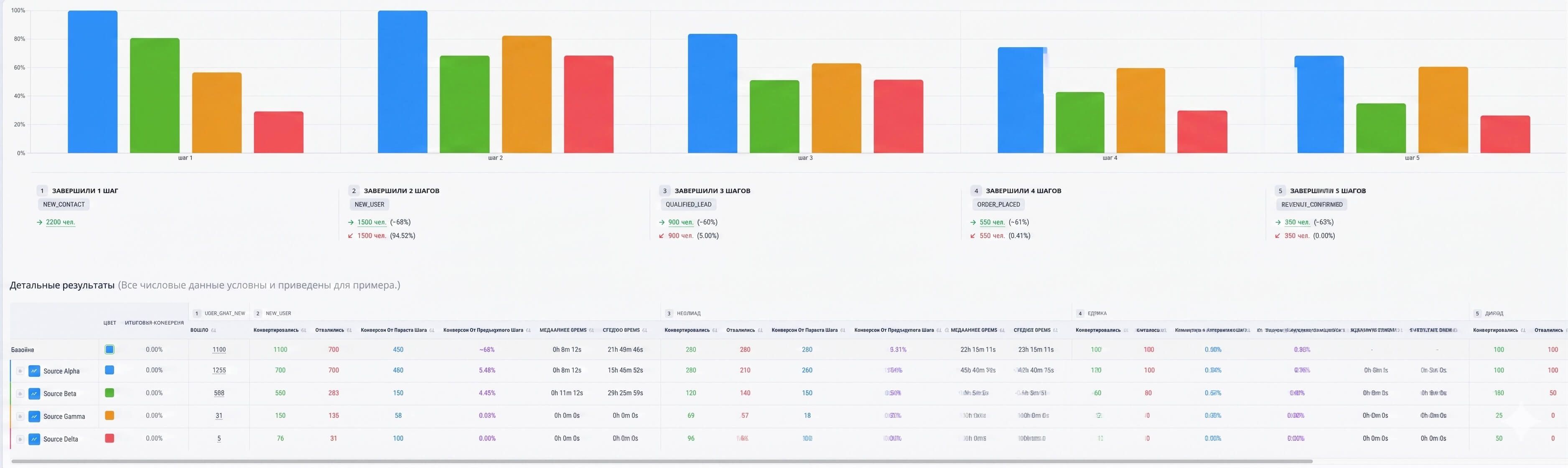
Once the channel and bot are connected, Graspil sees the full user journey: which UTM parameter brought them to the channel, when they launched the bot, and how they behave from there. All of this is displayed in a single report broken down by source — no exports from Bitrix24 required.
The next step is to add CRM events to the funnel to bring the analytics all the way to revenue.
Step 3. Passing Events from Bitrix24 to Graspil
KuriloCar’s sales funnel has several stages: contract, prepayment, final payment. To reflect these in analytics, events needed to be passed from Bitrix24.
Graspil offers two ways to do this:
- By keyword — if a manager writes something like “Prepayment received”, the system records the event automatically
- Via API — the event is created at the right moment with the right parameters
For KuriloCar, we went with the API: when a deal moves to a specific stage in Bitrix24, data is automatically sent to Graspil.
Result: Two Funnels
The outcome was two reports — for different customer entry scenarios.
Funnel 1 — via the channel (broken down by channel UTM parameters):
- Joined the channel
- Launched the bot
- Prepayment
- Final payment
Funnel 2 — directly into the bot (broken down by bot UTM parameters):
- Launched the bot
- Prepayment
- Final payment
Additional: Bot Setup
Two more tasks were handled in parallel.
Welcome sequence and reactivation. When the bot is launched, a welcome message sequence fires automatically with delays and conditions. If the client doesn’t respond within 15 minutes — they get another message. All configured through Graspil’s automation tool.
Passing UTM parameters to Bitrix24. When the bot launches, the system finds the relevant deal and contact in the CRM and updates the UTM fields — from both the channel and the bot.
An added bonus: the bot enables targeted broadcasts to the user base — a separate tool for audience engagement.
Summary
The client now has transparent analytics: it’s clear which traffic source makes it all the way through the funnel and brings in revenue. Plus a configured bot that warms up new users on its own and passes all data to the CRM.
If you have a similar challenge — Telegram tracking, Bitrix24 integration, or bot setup — reach out. During this project we refined several reports and features to fit the client’s specific needs, and we’re ready to quickly add the integrations you need for your case.