
How to Prepare Your Telegram Bot and Mini App for Launch
Hi, I’m Dima, the creator of graspil.com. I’ve studied many Telegram bots and decided to share some practical insights.
📦 Bot Presentation
The simplest but most overlooked aspect by many bot builders. Remember, first impressions matter.
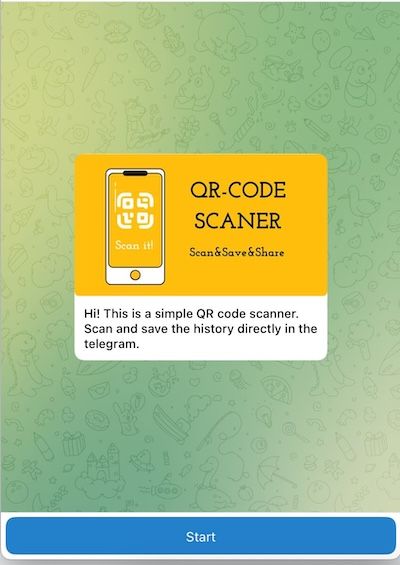
1. Start Screen
Add an image and a short description of what your bot does. You can also include links for feedback, your website, or Telegram channel. Keep in mind — this message is shown only once when the bot is first launched.
2. Bot Description
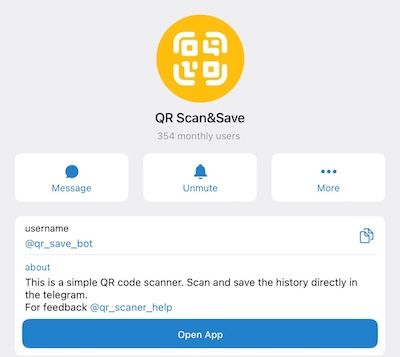
This section must include feedback links. If your bot crashes, this is often the only place where users can still contact you.
3. Start Message
This must include both media (image, GIF, or video) and text. Make it clear what your bot does and what the next step is. Include a call-to-action.
Don’t write walls of text. Keep it short and meaningful. Remove all unnecessary words.
4. Feedback
Let users contact you easily. Especially during the launch phase, bugs are inevitable. Don’t miss out on valuable conversations with users.
5. Text Input
Avoid making users type unnecessarily. For example, if asking “How often would you like to receive updates?”, offer popular options as buttons.
6. Buttons
Use colorful emojis in buttons. Some users don’t notice transparent buttons — emojis draw attention.
Avoid too many buttons. For example, don’t list 20 product categories — use a Mini App instead.
🔗 UTM Tags
UTM tags help track traffic sources — especially useful for ads. More about this here.
Sadly, UTM culture isn’t widespread in bots. Telegram search and even some ad platforms don’t allow tags.
Still, always tag links to your bot when possible.
How to Add Them?
You can pass data using the start parameter, like this:
https://t.me/graspil_bot?start=blog
The bot will receive /start blog as a message.
By saving this, you can analyze where users come from.
Graspil helps handle UTM tracking and simplifies data processing.
Limitations
- Only one start string allowed.
- Max 64 characters.
Graspil allows splitting this into multiple parameters using delimiters like - or _:
https://t.me/graspil_bot?start=source-radar_medium-blog
Becomes:
- source = radar
- medium = blog
Plan UTM Strategy Early
Choose your delimiter strategy during bot development to avoid inconsistencies later.
Redirect Links
Use short links with parameters, e.g.:
https://tlin.cc/graspil_bot?utm_source=radar¶m1=example
Graspil will assign tags and even detect geolocation.
Make sure additional parameters don’t break your bot. Some no-code platforms may struggle here.
🧩 Mini App
Design
Stick to Telegram’s UI Kit where possible. Familiar UI boosts conversions.
Test on All Platforms
Check behavior on iOS, Android, macOS, and Windows. Telegram apps can behave differently across devices.
Telegram Versions
Graspil shows which versions your users are on: • 80% latest version • 10% previous version • 10% older
UTM Tags in Mini App
Just like bots — but use startapp instead of start.
Tracking Launch Buttons
You can add parameters to track which button launched the Mini App (e.g. from a channel, inline keyboard, etc.).
💸 Stars or Fiat?
Can I accept fiat payments in bots?
Only if you don’t sell physical goods. But yes — it’s doable. Even big bots bypass the “stars-only” rule. Usually, Telegram sends a warning first — not an immediate ban.
Are conversions better with Stars?
Not necessarily. Although native, they don’t always convert better.
🛠 Additional Tips
Bot Block Tracking
Track how many users block your bot to understand retention and acquisition quality. Here’s how.
Detect Client Language
If your bot supports multiple languages, auto-detect and set the default. Many ignore this!
Collect Your Audience
Maintain an up-to-date user list in your database. It’s hard to restore later (e.g., for newsletters — Graspil helps with those). Telegram caching makes 100% recovery impossible.
Monitor Bot Uptime
Don’t ignore bot response failures — missed replies = lost money.